Mini Network Box Device Information

Mini Network Box Overview
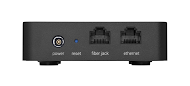
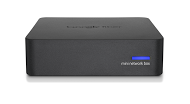
The Mini Network Box serves as a router, which provides internet service for your home network. You can connect computers and other devices to the Mini Network Box using an Ethernet cable or wirelessly over Wi-Fi. Only one device can be wired directly to the Mini Network Box at a time. Connecting directly to the Mini Network Box provides the fastest speeds on your network.
Understand Light Statuses
When your Mini Network Box is properly connected, the LED on the front lights up solid blue. If the light doesn't turn solid blue within 2 minutes of connecting to power, please contact GFiber customer support.
Connect Your Devices
You can connect computers and other devices to the Mini Network Box using Wi-Fi or an Ethernet cable.
-
Wired connections: Only one device can be wired directly to the Mini Network Box at a time. Connecting directly provides the fastest speeds on your network.
-
Wireless connections: As the number of wireless devices on your network increases, you might notice a dip in performance.
-
Manage your network: You can manage your settings on the Network tab in your GFiber account.
Safety and Handling
Please follow these guidelines to keep your device working properly and your home safe:
-
Keep it dry: Do not use your Mini Network Box near water or clean it with a wet towel.
-
Provide ventilation: Place the device on a solid, unobstructed surface. Do not place it on soft surfaces like carpet, as this can block the vents.
-
Avoid heat: Keep the device away from radiators, heaters, and other electronics that produce heat.
-
Powering off: The Mini Network Box does not have an on/off switch; simply unplug it to turn it off.
-
Do not open: Do not attempt to open, modify, or repair the device yourself, as this could cause injury or electric shock and will void your warranty.
Technical Specifications and Compliance
-
Dimensions: 3.8" W x 3.8" D x 0.94" H.
-
Property of GFiber: The Mini Network Box is GFiber property. If it is lost or damaged, you may be responsible for the replacement cost.
-
FCC Compliance: This device complies with part 15 of the FCC Rules. It is designed for indoor use and should be kept at least 20 cm away from persons during operation.
-
Sustainability: If you no longer need your Mini Network Box, you do not need to return it to GFiber. You can dispose of it responsibly at a local e-waste recycling center.